Choosing Vehicle Graphics and Paint Protection Film
A hood sketch, two manufacturer data sheets and three questions to help you choose a graphic or check a paint protection claim.
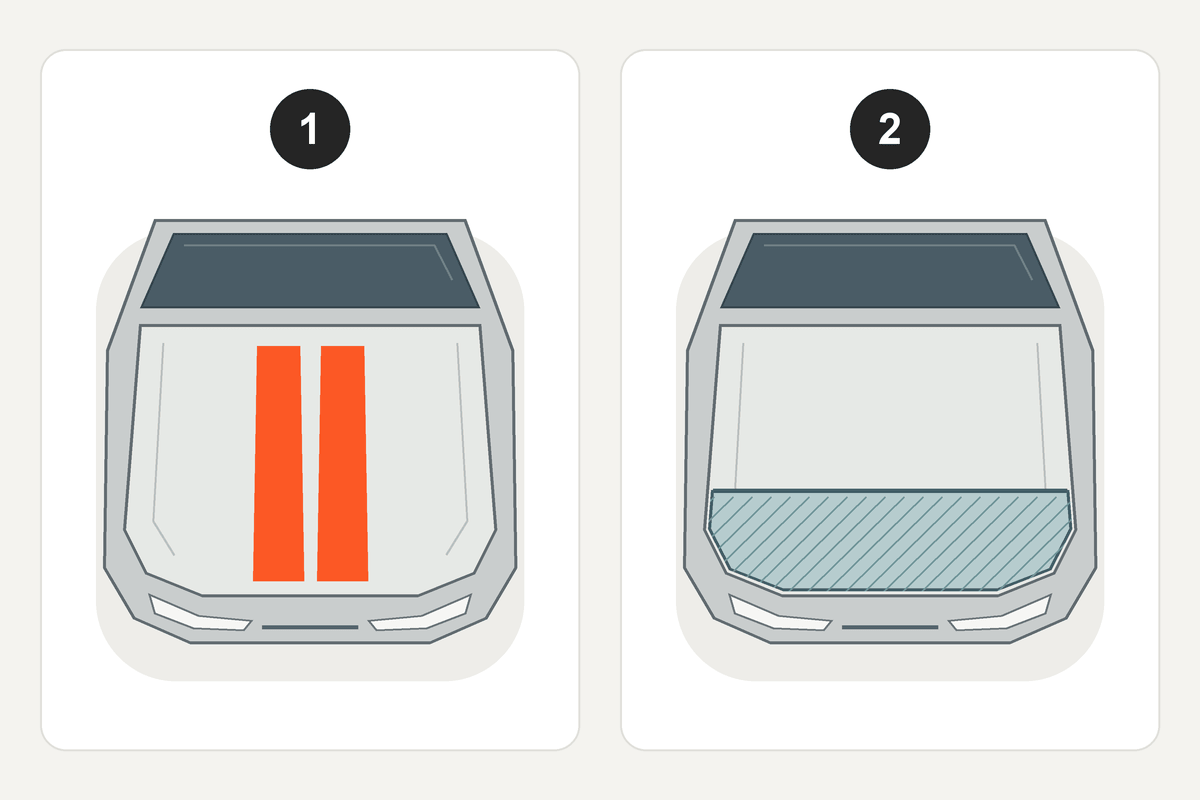
Start with a photo of the hood. Mark where you want a stripe to show and where you’re concerned about stone chips. Those two marks help you describe what you want from each film.
1. Plan the graphic
For a visible graphic, compare shape, placement and finish. SupDec’s Hemi-style hood stripe listing lists one hood decal described as Avery vinyl. Its finish selector includes gloss and matte. For a larger color change, the ORACAL 970RA technical data sheet describes a cast PVC film developed for vehicle wrapping.
2. Check the protection claim
If chip resistance is your goal, look up the exact paint protection film (PPF). ORAFOL describes ORAGUARD PPF2815GF as a transparent polyurethane film and reports a pass in an SAE J400 test with 2.4 L of gravel in its technical data sheet. Read that result for the named film under those test conditions.
Three questions before you order
- Which film series and finish will you supply?
- Which panels and edges does the quote cover? Can you mark the coverage on my photo?
- Which test result supports the protection claim for that film?
If a graphic and PPF will share a panel, ask your installer to confirm the layer order and the surface each film will bond to. For help with the graphic, ask a question and include the product link and your marked photo.