This item does not fit my 2024 stingray HTCSide Bed Fender Punisher Jake Decal Graphic Sticker Kit Chevy Corvette Z06 C8 2 Colors 2

- Log in
- 0

Kit consist of2 decals (left and right side)
MaterialHigh quality Avery vinyl
Side · 1-color design
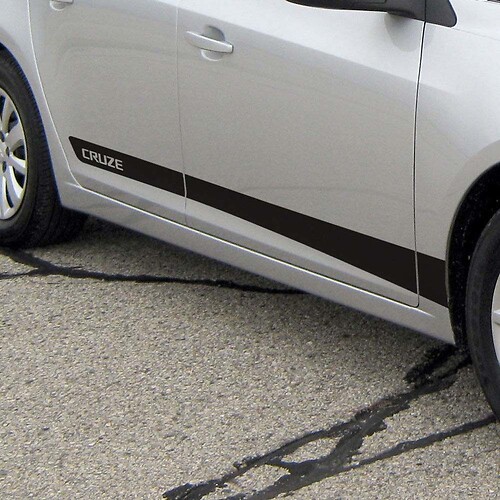
Racing Stripes Side Vinyl Decal Sticker for Chevrolet Cruze 2016-2019
Chevrolet Cruze · 2016–2019 (US)
Default size: as on the picture
AUD 89.46Make it yours
Made to order
in our own studio, ships in 1–2 business days
Worldwide Shipping
Tracking provided after production and dispatch.
30-Day Issue Resolution
Damaged, defective, or incorrect items are covered.
Description
Refresh the profile of your Chevrolet Cruze with a sleek side accent. This Racing Stripes vinyl decal set is designed for the 2016–2019 Cruze and adds a dynamic, sporty touch along the lower doors and rocker area.
The set includes graphics for both sides of the car and arrives ready to apply.
- Compatibility: for Chevrolet Cruze 2016, 2017, 2018, 2019
- Placement: side panels
- Set includes: 2 decals (left and right side)
- Material: high quality Avery vinyl
- Size: as on the picture
Each decal arrives with transfer tape pre-applied to assist with positioning during installation. Default color is as shown in the images.
Add a subtle performance look that complements the Cruze’s lines while keeping the application straightforward for DIY enthusiasts.
Guarantee / Replacement Support
Every product is made to order and carefully inspected before shipping.
If your order arrives damaged, defective, or incorrect, we will replace it or help resolve the issue.
Please contact us within 30 days of delivery and include clear photos of the product and packaging.
Return Policy
Because our decals are made to order, we do not accept returns for incorrect color choice, wrong size selection, or change of mind.
Returns or replacements are accepted only if the item is damaged, defective, or different from what was ordered.
Reviews
All store reviewsNo reviews for this design yet. What other customers say:
Item was customized exactly to fit my 2020 C8 Corvette and the measurements are excellent!Chevy Corvette C8 Z06 JAKE Hood Vinyl Decal Stickers